모든 HTML element는 종류에 따라 block 또는 inline과 같은 display 값을 갖는다.
1. Block-level Elements
- 항상 새로운 line에서 시작한다.
- 브라우저가 자동적으로 element의 앞 뒤에 space를 추가한다.
- 가로 전체를 차지한다.
- 해당 태그 : <p>, <div>
2. Inline Elements
- 새로운 line에서 시작하지 않는다.
- 필요한 가로 길이만 차지한다.
- 해당 태그 : <span>
img 태그는 Inline-level Elements이다.
    <header>
      <div class="inner">
        <img src="images/busan.jpg" alt="부산" />
      </div>
    </header>
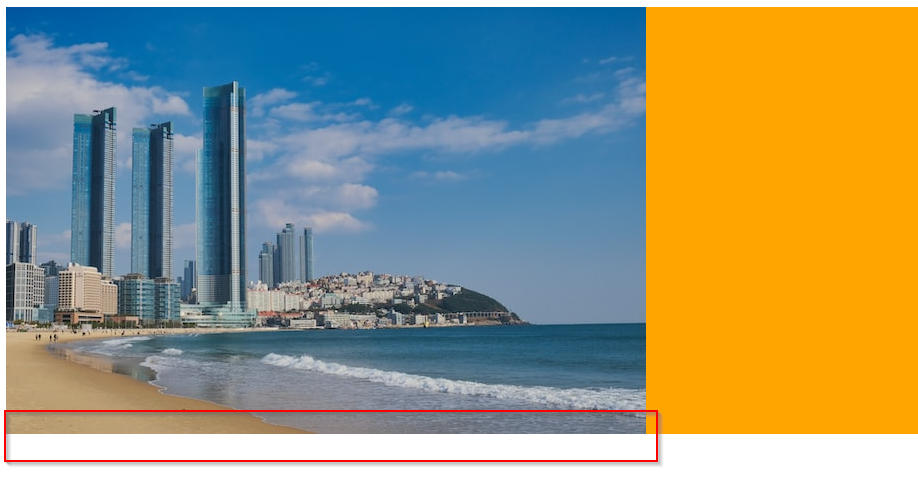
아래 사진 처럼 하단에 공백이 생기는 것을 볼 수 있다.
Inline-level Elements이기 때문이다.

CSS 속성에서 display: block으로 설정하면,
Block-level Elements로 취급하게 된다.
img {
  display: block;
}

header {
  background-color: royalblue;
}

header .inner {
  margin: 0 auto;
  background-color: orange;
}
하단 공백이 사라지게 된다.
CSS에서 'display' property는 element를 block 또는 inline 중 어떻게 취급할 것인지를 정의한다.
참고자료
1. HTML Block and Inline Elements
https://www.w3schools.com/html/html_blocks.asp
HTML Block and Inline Elements
W3Schools offers free online tutorials, references and exercises in all the major languages of the web. Covering popular subjects like HTML, CSS, JavaScript, Python, SQL, Java, and many, many more.
www.w3schools.com
2. display - CSS: Cascading Style Sheets | MDN
https://developer.mozilla.org/en-US/docs/Web/CSS/display
display - CSS: Cascading Style Sheets | MDN
The display CSS property sets whether an element is treated as a block or inline element and the layout used for its children, such as flow layout, grid or flex.
developer.mozilla.org
'개인기록 > 개발공부' 카테고리의 다른 글
| [CodeIgniter] Ubuntu에 설치 (1) | 2022.12.13 |
|---|---|
| 공부일지 #6. 영어로 HTML/CSS 기본 공부 (feat. Udemy) (0) | 2022.12.10 |
| 공부일지 | #6. 패스트캠퍼스 실습 따라하기 (1) | 2022.12.02 |
| 공부일지 | #5. 새벽 기상 후, 출근 전까지 코딩 (0) | 2022.12.01 |
| [Bootstrap] 예시(Examples)의 코드를 뽑아내는 방법 (0) | 2022.12.01 |


